How to Set Up IPTV Provider Using Xtream Codes (Step-by-Step Guide)
June 17, 2026 · 5 min read
If you're new to IPTV, you've probably come across something called "Xtream Codes".
The good news is that connecting an IPTV provider using Xtream Codes is much easier than it sounds.
In fact, if your IPTV provider supports Xtream Codes (and most do), you can usually start streaming in less than a minute.
In this guide, we'll show you exactly how to connect your IPTV provider to EVStream and start watching live TV, movies and series directly from your browser.
What Are Xtream Codes?
Xtream Codes is one of the most common ways IPTV providers allow users to access their subscriptions.
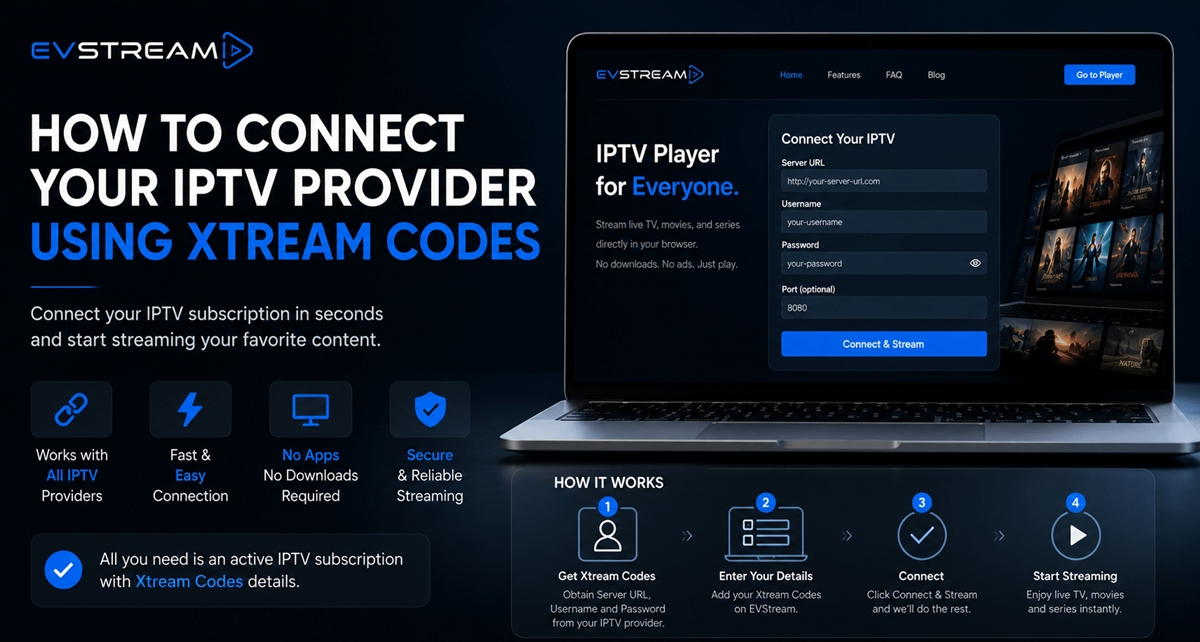
Instead of importing large playlist files, most providers simply give you three pieces of information:
- Server URL
- Username
- Password
These credentials allow IPTV players to connect directly to your provider and load your channels, movies and series.
If you're already subscribed to an IPTV service, there's a good chance you already have these details.
Before You Start
Before connecting your IPTV provider, you'll need an active IPTV subscription.
EVStream does not provide IPTV content or subscriptions.
Instead, EVStream acts as a browser-based IPTV player that allows you to access your existing IPTV service.
You'll need:
- An active IPTV subscription
- Xtream Codes credentials from your provider
- A web browser
- An internet connection
Does EVStream Work With My IPTV Provider?
In most cases, yes.
EVStream works with virtually all IPTV providers that support Xtream Codes authentication.
If your provider gave you a Server URL, Username and Password, there's a very good chance you can connect using EVStream.
Option 1: Connect Directly From the Homepage
The fastest way to connect your IPTV provider is directly from the EVStream homepage.
Step 1: Visit EVStream
Open:
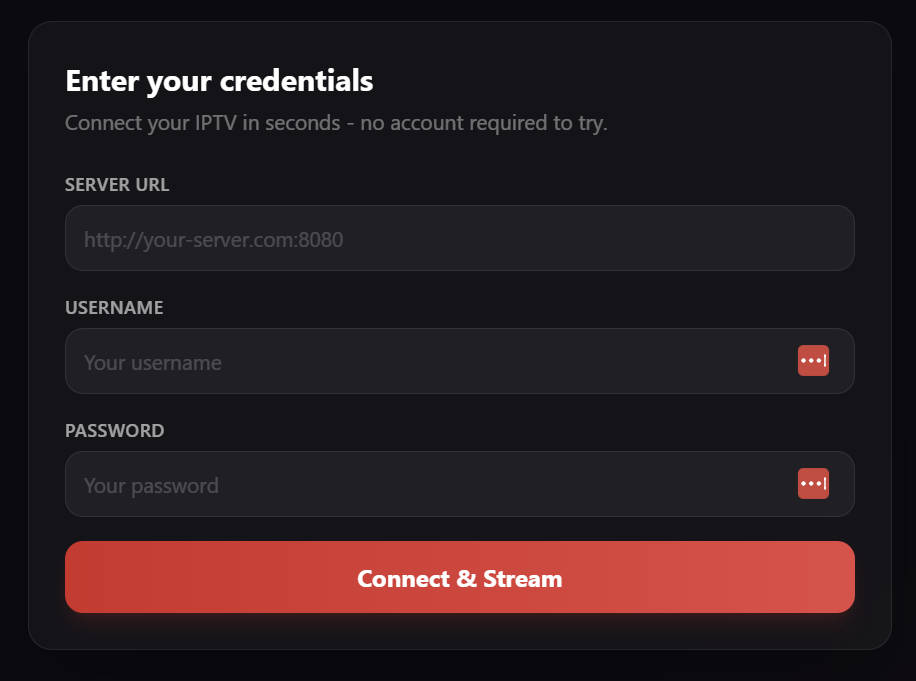
At the top of the page, you'll find the Connect & Stream form.
Step 2: Enter Your IPTV Credentials
Enter the following information exactly as provided by your IPTV provider:
- Server URL
- Username
- Password
Be careful when copying and pasting.
Even a small typo or extra space can prevent the connection from working.
Step 3: Click "Connect & Stream"
Once your details are entered, click the Connect & Stream button.
EVStream will verify your credentials and load your IPTV content.
Visual Guide
📍 Homepage
Option 2: Connect From the Dedicated Connect Page
If you prefer, you can also connect using the dedicated connection page.
Step 1: Open the Connect Page
Navigate to:
Step 2: Enter Your Xtream Codes
Fill in:
- Server URL
- Username
- Password
Step 3: Start Streaming
Click Connect & Stream and wait a few seconds while EVStream loads your content.
Once connected, you'll be able to browse:
- Live TV channels
- Movies
- TV series
- Saved playlists
Common Connection Issues
If your IPTV provider doesn't connect successfully, check the following:
Double Check Your Credentials
The most common issue is an incorrect:
- Server URL
- Username
- Password
Make sure everything matches exactly what your provider supplied.
Check Your IPTV Subscription
If your subscription has expired, EVStream won't be able to access your content.
Contact your IPTV provider if you're unsure about your subscription status.
Device Limits
Some IPTV providers limit the number of simultaneous connections.
If you've reached your provider's limit, you may need to disconnect another device before connecting again.
Save Your Playlist for Faster Access
Once connected, EVStream allows you to save playlists for quicker access in the future.
This means you won't need to enter your credentials every time you want to watch.
Simply select your saved playlist and continue streaming.
Why Use EVStream?
EVStream was originally created to improve IPTV streaming on Tesla and EV browsers.
Today, it's used by IPTV subscribers worldwide because it's simple, fast and works directly from the browser.
Benefits include:
- No software installation
- No downloads required
- Works with virtually any IPTV provider
- Browser-based streaming
- Playlist management
- Tesla browser support
- EV browser support
- Desktop and mobile compatibility
- Clean, ad-free experience
Final Thoughts
Connecting an IPTV provider using Xtream Codes is one of the easiest ways to access your IPTV subscription.
All you need is your Server URL, Username and Password.
Whether you're using a desktop computer, smartphone, tablet, Tesla browser or another EV browser, EVStream makes it easy to connect and start streaming in seconds.
If your IPTV provider supports Xtream Codes, you're only a few clicks away from watching your favorite channels, movies and series.
Open your Tesla browser and try it today
Charge your car. Stream your favorites.
Launch EVStream.app